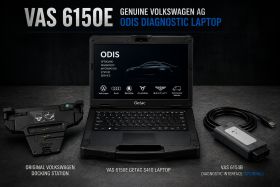
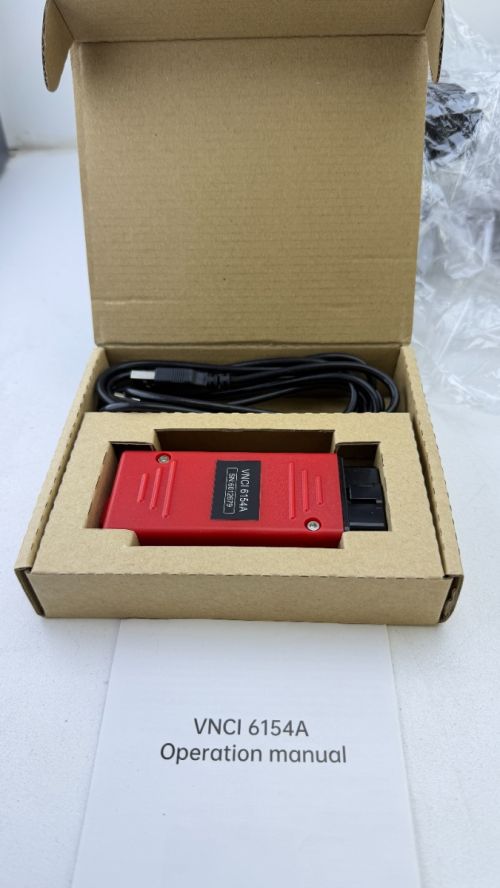
Audi VW Skoda Cupra SEAT VNCI 6154A VAS6154A Clone ODIS Diagnostic Interface
VAS 6154A-compatible diagnostic interface for use with supported ODIS Service and ODIS Engineering environments across Volkswagen Group vehicles.
This aftermarket / clone interface provides a cost-effective way to connect compatible Audi, Volkswagen, Skoda, SEAT, Cupra, Bentley and Lamborghini vehicles to professional ODIS diagnostic software for fault diagnosis, live data, guided functions, adaptations, coding and supported programming procedures.
VNCI VAS6154A Clone ODIS Diagnostic Interface for Audi VW Skoda SEAT Cupra
VNCI 6154A ODIS Diagnostic Interface
VNCI 6154A is an aftermarket VAS6154A-compatible diagnostic interface designed for use with Volkswagen Group vehicles and supported ODIS diagnostic environments.
It provides a cost-effective professional diagnostic solution for Audi, Volkswagen, Skoda, SEAT, Cupra and other Volkswagen Group applications, with support for modern communication protocols including UDS, DoIP and CAN FD.
When used with the appropriate ODIS environment, diagnostic data and authorised access, the interface can support a wide range of vehicle diagnostic, coding, adaptation and programming functions.
Key Features
- VAS 6154A-compatible diagnostic interface
- Designed for compatible ODIS Service and ODIS Engineering environments
- Professional Volkswagen Group vehicle diagnostics
- Vehicle identification and complete system scanning
- Fault-code reading and clearing
- Live measurement values and diagnostic data
- Actuator and output testing
- Guided fault finding and guided functions
- Control-module adaptations
- Control-module coding
- Basic settings and calibration procedures
- Supported control-module programming and software-update procedures
- Wireless WLAN communication
- Direct USB connection for stable wired diagnostics
Supported Volkswagen Group Brands
- Audi
- Volkswagen
- Volkswagen Commercial Vehicles
- Skoda
- SEAT
- Cupra
- Bentley
- Lamborghini
Compatible ODIS Environments
The interface is designed for use with compatible Volkswagen Group diagnostic environments including:
- ODIS Service
- ODIS Engineering
- Compatible Volkswagen Group diagnostic data packages
ODIS Service is commonly used for vehicle identification, fault diagnosis, guided diagnostics, live data, workshop procedures, adaptations, coding and supported online functions.
ODIS Engineering provides additional engineering and development functions for suitably experienced users.
Diagnostic Functions
- Automatic and manual vehicle identification
- Complete vehicle control-module scan
- Diagnostic fault-code reading and clearing
- Live data and measurement values
- Actuator and output tests
- Guided fault finding
- Guided functions
- Control-module adaptations
- Control-module coding
- Basic settings
- Calibration procedures
- Supported software updates and programming
- Supported security and online functions with authorised access
Communication Protocols
The VAS 6154A platform supports the communication systems required across a broad range of Volkswagen Group vehicles, including:
- UDS – Unified Diagnostic Services
- High-speed CAN
- Low-speed CAN
- K-Line
- SAE J1850 where applicable
- DoIP on supported vehicle platforms and configurations
USB & Wireless Connection
The interface can be used through a direct wired USB connection or configured for wireless WLAN communication.
- USB – direct connection between the diagnostic interface and computer
- WLAN infrastructure mode – communication through a configured workshop network
- WLAN direct mode – direct wireless connection to the diagnostic computer
USB operation provides a stable connection and is particularly useful for programming or software-update procedures where a wired connection is preferred.
ODIS Setup
No vehicle coding is required for the diagnostic interface itself. Initial installation normally involves configuring the interface software, firmware, USB or WLAN connection and selecting the interface within the installed ODIS environment.
Once configured, the interface functions as the communication bridge between ODIS and the vehicle's electronic control units.
Online Functions
ODIS can support a range of manufacturer online functions including coding, Software Version Management, programming, immobiliser-related procedures, security functions and component protection.
These online services operate through the appropriate Volkswagen Group diagnostic accounts, subscriptions and user permissions. The interface itself is the vehicle communication hardware used by the diagnostic environment.
Programming & Workshop Use
For control-module programming and software updates, use a stable USB connection where required by the diagnostic procedure and connect the vehicle to a suitable regulated battery-support unit.
Maintaining stable vehicle voltage and communication throughout programming is essential for reliable control-module flashing and software updates.
Package Contents
- 1 × VAS 6154A-compatible diagnostic interface
- 1 × USB connection cable
Computer, tablet, ODIS software, diagnostic licences, manufacturer accounts and subscriptions are not included unless specifically stated in the selected package.
Professional Volkswagen Group Diagnostics
This VAS 6154A clone interface is a practical lower-cost diagnostic solution for workshops, technicians and experienced users working with Volkswagen Group vehicles through ODIS.
It provides the core vehicle communication required for professional diagnostics while supporting the familiar VAS 6154A-style workflow across Audi, Volkswagen, Skoda, SEAT, Cupra and other Volkswagen Group applications.
| OEM Part Number | VAS |
|---|---|
| Brand | Volkswagen AG |
| Condition | Brand new |
| Installation time (h) | 4 |
| Supersedes SKU's: | 12000045917215763 |
| Rack | 1 |
| Shelf | 3 |
| Shelf side | Front |
Note:
Installation & Configuration
Professional installation and configuration are available through Euro Car Electronics. If you prefer to have this product professionally fitted, our team can assist with installation and any required vehicle setup.
Enquire about professional installation ↗
IMPORTANT: Some products require professional installation or specific installation procedures. Please review the product information and our Warranty Support & Returns ↗ information before installation.-
 Special Price $3,850.00 Regular Price $6,995.00
Volkswagen Audi Škoda CUPRA VAS 6160A ODIS Diagnostic Kit with VAS 5054A
-
 Special Price $4,500.00 Regular Price $6,095.00
Volkswagen Audi Skoda Cupra Getac S410 G5 ODIS Diagnostic Laptop