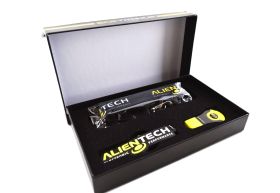

Alientech Powergate 4 Portable ECU TCU Programmer Remote Tuning Tool
Brand
Alientech
Alientech Powergate 4 is a compact personal ECU and TCU programmer designed for remote tuning through the Powergate App. The vehicle owner can identify, read and write supported control units through the OBD port while the tuner manages original and modified files through the Alientech Dashboard and Cloud. Suitable for supported cars, light commercial vehicles and motorcycles.
Key Features:
- Portable ECU/TCU programming for cars and motorcycles
- Single-vehicle pairing (reset credits available for re-use on another vehicle)
- Compact design: 10 x 10 x 2 cm and 135g in weight
- Built-in GPS, accelerometer, Bluetooth, and Wi-Fi for intelligent logging and app connectivity
- Cloud-based management system – tune from anywhere in the world
- Intuitive mobile app for Android (v7.0+) and iOS (v12.0+)
How It Works:
- Connect the Powergate device to your vehicle's OBD port
- Pair with the mobile app for reading and writing ECU/TCU files
- Receive tuning files from your tuner via the cloud dashboard
- Flash your custom or performance tune directly to your vehicle
Compatible vehicle list in DOWNLOADS section or here: https://www.alientech-tools.com/vehicles/
-
 Special Price $295.00 Regular Price $495.00
Powergate 4 ECU & TCU Programmer - App-Controlled Remote Vehicle Tuning by Alientech
Powergate 4 ECU & TCU Programmer – Portable Vehicle Tuning Solution
Alientech Powergate 4 (PWG4KIT000) is the next-generation personal ECU and TCU programmer, designed to make professional vehicle tuning accessible directly through the vehicle's OBD port. Compact, app-controlled and easy to use, Powergate allows tuning files to be installed without a laptop or specialist programming equipment.
Powergate supports an extensive and continually expanding range of cars, light commercial vehicles and motorcycles, covering a wide variety of modern petrol and diesel engine management systems and transmission control units. Alientech continuously expands its vehicle and ECU/TCU coverage, making Powergate a highly versatile platform for modern performance tuning.
For vehicle owners and enthusiasts, Powergate provides a simple way to receive and install professionally developed ECU and TCU calibrations. For professional tuners, it creates a powerful remote-tuning solution that allows customers to install supplied calibrations wherever they are.
For tuners: Powergate integrates with the Alientech Dashboard and cloud ecosystem, allowing tuning businesses to manage customers, vehicles and calibration files remotely. This makes it possible to extend your tuning services well beyond the physical workshop.
Why Choose Powergate 4?
- Extensive vehicle coverage across supported cars, light commercial vehicles and motorcycles
- ECU and TCU tuning for a wide range of modern control units
- Simple OBD connection with no laptop required for the customer
- Smartphone-controlled operation through the Powergate App
- Remote tuning capability for receiving and installing professionally prepared calibration files
- Secure cloud-based file management through the Alientech ecosystem
- Compact and portable enough to remain with the vehicle
- Continuously expanding coverage through Alientech's ongoing development
Connecting with Ease
Powergate 4 is designed around a simple, guided user experience. Connect the device to the vehicle's OBD port, pair it with the Powergate App on your smartphone and follow the on-screen process to access the tuning functions and calibrations prepared for your vehicle.
The result is a professional remote-tuning platform that connects the vehicle owner directly with their tuner – without requiring repeated workshop visits or complicated programming equipment.
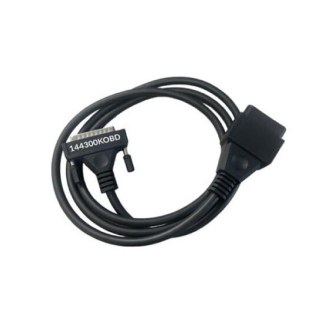
OBD to DB25 Connection
Powergate supports OBD connectivity for both cars and motorcycles using a robust and visually matched DB25-style cable. The cable design complements the Powergate unit, creating a unified and professional appearance while ensuring a secure and reliable connection to the vehicle.
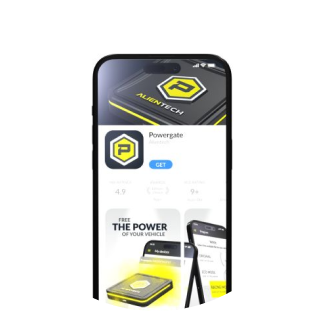
Powergate Mobile Application
The Powergate App is available for iOS, Android, and Huawei devices, offering an intuitive interface for tuning and managing your Powergate unit. The app ensures a streamlined tuning workflow, with guided steps, Bluetooth pairing, and direct access to Alientech cloud services — all from your smartphone.
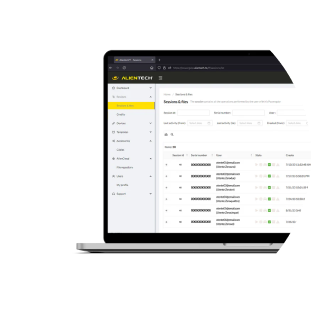
Desktop Dashboard
The Powergate also features a powerful PC dashboard, enabling real-time monitoring and advanced file management. Tuners can easily track connected devices, manage user profiles, and share tuned files instantly — making professional tuning faster and more efficient.
From garage to remote tuning – Powergate makes setup effortless at every step.
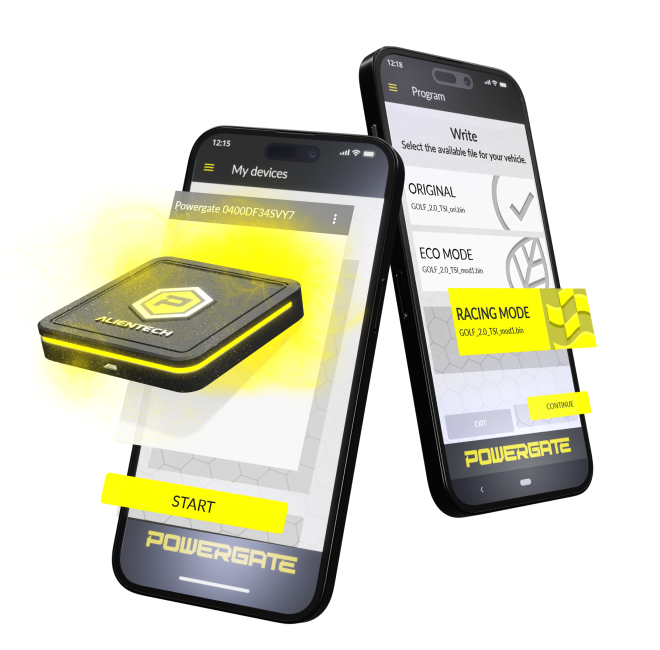
Powergate 4 – ECU Tuning Tool & Smartphone App
The Powergate App is a powerful yet user-friendly application designed to give you full control of your Powergate 4 programmer directly from your smartphone. Available on Google Play, Apple App Store, and Huawei AppGallery, the app streamlines the tuning process from setup to reprogramming.
Simple Setup and Seamless Integration
Once downloaded, the app walks you through a quick and intuitive onboarding process. Create your profile using your ALIEN_id, connect the Powergate device via Bluetooth, and you're ready to begin your first ECU programming session — all without the need for a laptop or cables.
App Features:
- Step-by-step guidance for ECU and TCU reading/writing
- Secure connection and tool pairing via ALIEN_id
- Customisable user settings including language, profile info, and preferences
- Real-time notifications and operational status tracking
- Cross-platform support: Android, iOS, Huawei
Remote Support Built-In
If you ever run into issues, the Powergate App provides direct access to remote support, so you're never left on your own. Whether you're a novice or a seasoned tuner, help is always a tap away.
With its clean design and powerful functionality, the Powergate App transforms complex ECU operations into an intuitive user experience — right in your pocket.
Key Features of the Powergate 4 Ecosystem
The Powergate 4 platform offers a wide range of advanced features that simplify tuning operations, device management, and user control—both for individual users and tuning professionals using Powergate Manager.
Sessions
Monitor the number and status of all active, archived, or ongoing tuning sessions in real time. Stay fully informed about what's happening on each connected Powergate device.
Tools
Manage and configure each connected Powergate unit independently. This includes firmware updates, device pairing, and advanced customisation options for individual tools.
User Profile Management
Upload and configure detailed user profiles, including a list of associated vehicles. You can fully customise access or restrict a user to a single vehicle for locked applications.
Templates
Use Powergate Templates to assign a unique setup to each user. Templates can include:
- Customised splash screens or branding ("skins")
- Vehicle compatibility filters
- Original and modified files (linked via Cloud or manual upload)
Templates simplify file distribution and maintain brand consistency across multiple users and devices.
Status Bar
The Status Bar on the Powergate Dashboard provides real-time monitoring of all tuning operations, including reading, writing, and session tracking. This helps both users and tuners ensure each step is progressing correctly.
Powergate Cloud
The Powergate Cloud revolutionises file management by acting as an online database for tuning operations:
- Stores and organises original and modified ECU/TCU files
- Enables file sharing across multiple Powergates and user accounts
- Offers automatic file association between original and tuned files via the Alientech database
- Simplifies user management with access-based sharing and file tracking
This cloud-based system automatically matches modified files to their original counterparts, ensuring consistent updates and reducing manual input—saving time and minimising the risk of user error.
Powergate Manager + Powergate Cloud = scalable, efficient, and professional tuning operations.
Powergate Operational Workflow
1. Connecting to the Vehicle
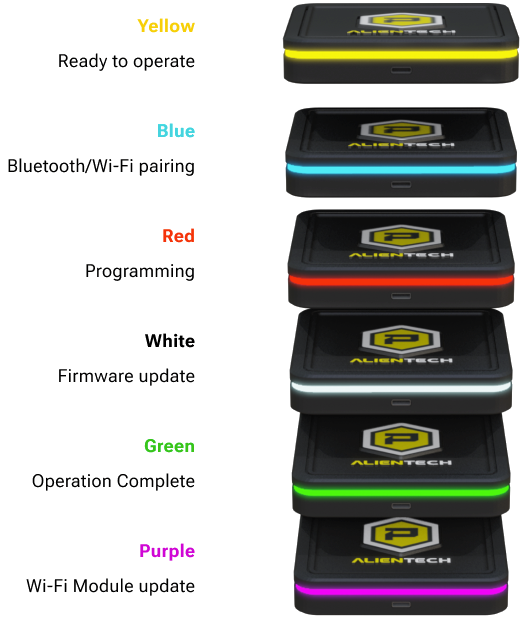
Insert the Powergate device into the vehicle’s OBD port. Once connected, the LED light will turn BLUE. Open the Powergate App on your smartphone and log in using your ALIEN_id profile to access Alientech cloud services.
2. Bluetooth Pairing
Enable Bluetooth in your smartphone’s settings and pair it with the Powergate device. A successful Bluetooth connection will be confirmed when the LED remains solid BLUE.
3. Internet Connectivity
Ensure both your smartphone and the Powergate are connected to the internet using the same network — either via a Wi-Fi router or a mobile hotspot. This connection is required for accessing and uploading tuning files.
4. Vehicle Selection
Within the Powergate App, select the correct vehicle brand, fuel type, and model. To ensure accuracy, choose the appropriate engine displacement. If in doubt, refer to the vehicle’s registration documents.
5. ECU Programming Steps
- Identification: Start by identifying the ECU type.
- Reading: Read the original ECU data and save it.
- Writing: Once the modified file is ready, write it back to the ECU.
The LED will transition from RED (active process) to GREEN once the programming is complete.
Scope of delivery:
- 1 x Powergate 4 ECU & TCU Programming Unit
Note: Powergate units are locked to a single vehicle. Additional credits are required to unlink and reuse on another car or bike.
| Brand | Alientech |
|---|---|
| Condition | Brand new |
| Coding required | Online |
| Country of Manufacture | Italy |
| Rack | 3 |
| Shelf | 1 |
| Shelf side | Front |
Note:
Compatible vehicle list in DOWNLOADS section or here: https://www.alientech-tools.com/vehicles/
Installation & Configuration
Professional installation and configuration are available through Euro Car Electronics. If you prefer to have this product professionally fitted, our team can assist with installation and any required vehicle setup.
Enquire about professional installation ↗
Coding is required after installation. Online coding is available for this product. Submit a coding enquiry↗
IMPORTANT: Some products require professional installation or specific installation procedures. Please review the product information and our Warranty Support & Returns ↗ information before installation.